

OpenAI's help centre now says ChatGPT agent is no longer available and points users to ChatGPT Work. We asked three AI engines to book a Melbourne plumber. None of them booked it. Here is what they did instead, and the seven things a service business needs ready.
ChatGPT agent mode is gone. OpenAI's own help centre, updated in mid-September 2026, opens the article titled "ChatGPT agent" with one line: "ChatGPT agent is no longer available. Use ChatGPT Work for longer, multi-step tasks and finished deliverables. For supported browser workflows, see Using cloud browser in ChatGPT." The launch post from July 2025 now carries a banner saying it is outdated. Almost every page ranking for "chatgpt agent" in Australia still describes the product as if you can switch it on today.
This page gives you three things those pages do not: the current status with the exact quotes and dates, a real test where we asked ChatGPT, Gemini and Perplexity to book a plumber in Melbourne, and the list of things that decide whether an AI hands a customer your phone number or somebody else's. One disclosure: we sell AI SEO services, so read the checklist with that in mind. Every item on it comes from OpenAI's own documentation of how the agent behaved.
If you run a service business, the product change matters less than the pattern underneath it. The AI still will not book your job. It hands the customer a name, a number and a script, and then the phone rings. Or it does not.
TL;DR
- OpenAI's help centre (updated mid-September 2026) states "ChatGPT agent is no longer available" and points users to ChatGPT Work, workspace agents, and a cloud browser for browser tasks.
- The same help article still lists the old limits (Plus 40 messages a month, Pro 400) and still says agent mode is "currently available" on five plans. It contradicts itself, which is why "why is ChatGPT agent mode gone" is a common search.
- ChatGPT Work launched on 9 July 2026 alongside GPT-5.6. It is a paid-plan feature, not something a sole trader gets for free.
- We asked three engines to "Book me a plumber in Melbourne for tomorrow morning to fix a leaking tap" on 17 September 2026. None booked. All three named local plumbers and drafted the message to send. Two of the three handed over phone numbers.
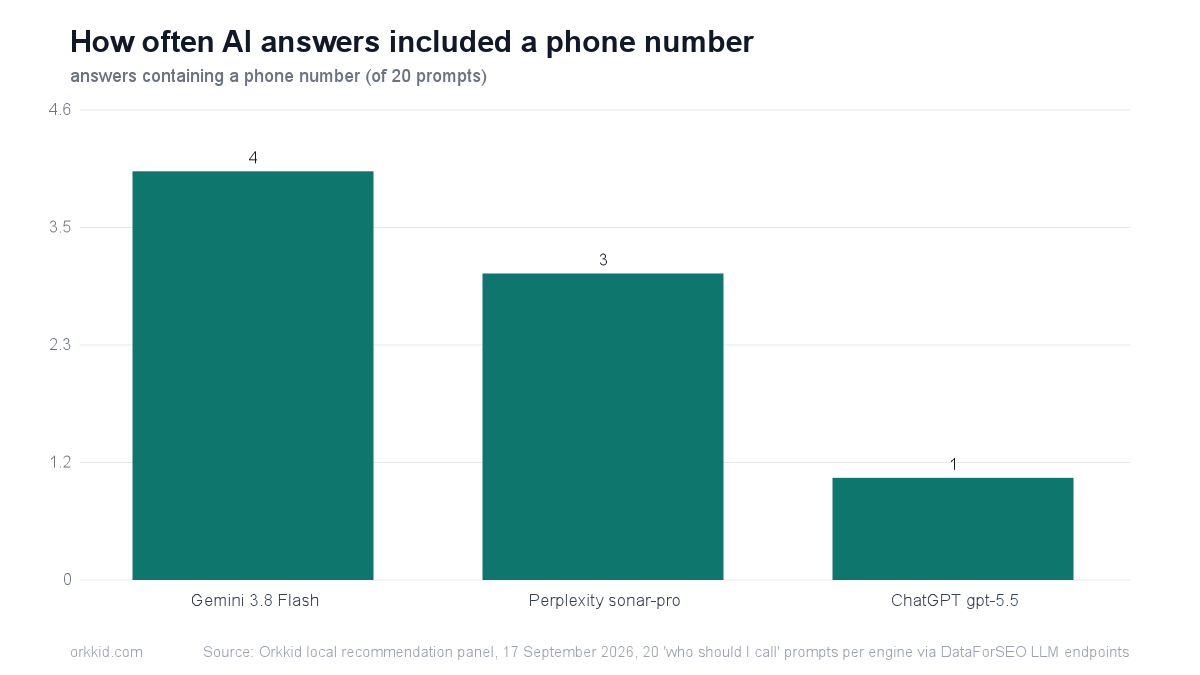
- Across our wider 20-prompt panel the same day, phone numbers appeared in 1 of 20 ChatGPT answers, 4 of 20 Gemini answers and 3 of 20 Perplexity answers. The prompts that produced them were the emergencies: a blocked drain and an after-hours vet.
- The retired agent paused whenever it hit a login or a CAPTCHA. That is still where every automated path into your business stops.
Why is ChatGPT agent mode gone?
OpenAI retired it and folded agentic work into ChatGPT Work, workspace agents and a cloud browser. There was no separate obituary, just two notices that appeared on existing pages. The OpenAI help article on ChatGPT agent now opens with "ChatGPT agent is no longer available. Use ChatGPT Work for longer, multi-step tasks and finished deliverables. For supported browser workflows, see Using cloud browser in ChatGPT." The article was updated in mid-September 2026.
The original launch post from 17 July 2025 got a banner rather than a rewrite: "This launch post is outdated. For current agentic work and team workflows, explore: Workspace agents, ChatGPT Work."
Here is the part that causes the confusion. Below the retirement notice, the same help article still reads "Agent mode is currently available on Pro, Plus, Business, Enterprise, and Edu plans" and still lists the monthly message limits. The body was never rewritten. So a searcher lands on OpenAI's own page, reads that the product is dead in the first paragraph and alive in the third, and goes looking for an answer. A thread on OpenAI's community forum is titled "Agent Mode was removed with no real replacement".
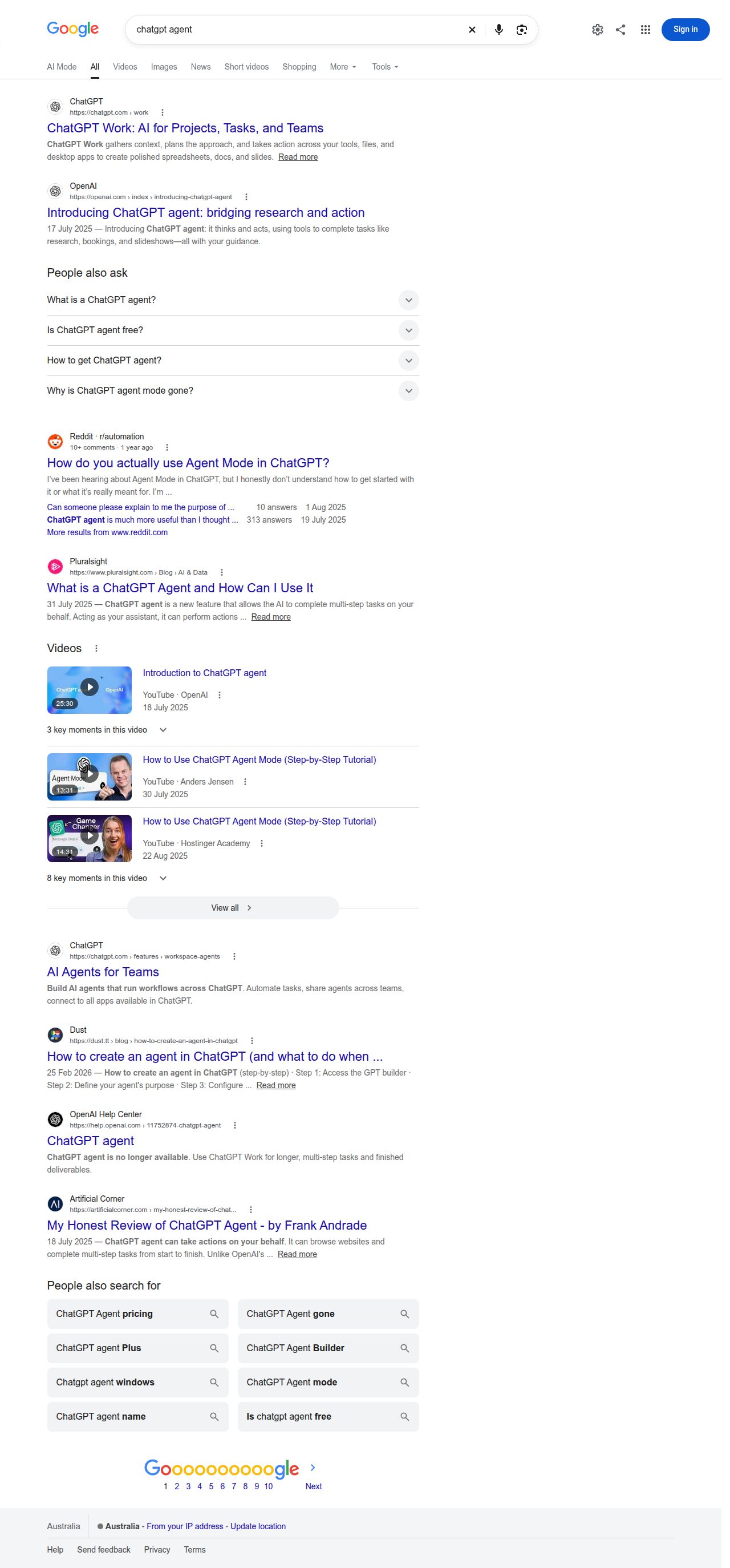
Five of the eight pages on page one of Google Australia describe a live product. Only the help article, at position seven, states the current position.

What ChatGPT agent could do, and what it cost
It browsed the web in a virtual browser, clicked buttons, filled in forms, ran code in a terminal and produced finished files. The launch post described the toolkit as "a visual browser ..., a text-based browser ..., a terminal, and direct API access". The help article is blunter about the mechanism: "ChatGPT agent uses screenshots of its virtual browser window to 'see' and interact with web pages. This allows it to click buttons, fill out forms, and navigate websites."
It was never free. The limits below are the ones OpenAI's help article still lists, which is what pages ranking today are quoting. Treat them as the historical position, not as something you can buy.
| Plan | Monthly agent limit (as documented) | Status |
|---|---|---|
| Free | Not available | Retired product |
| Plus | 40 messages a month | Retired product |
| Pro | 400 messages a month | Retired product |
| Business and Enterprise | 40 messages a month | Retired product |
| Business and Enterprise on flexible pricing | 30 credits a message | Retired product |
Two safety details matter for the rest of this article, because they explain where automation stopped. The launch post said "ChatGPT requests permission before taking actions of consequence, and you can easily interrupt, take over the browser, or stop tasks at any point." The help article adds the specific one: "If a task requires a login, ChatGPT agent will pause and prompt you to take control of the virtual browser."
An independent test published on the day of launch found the same. Frank Andrade's honest review of ChatGPT agent ran two research tasks that took 14 and 23 minutes, and both needed him to take over the browser for a login or a CAPTCHA.
What replaced it: ChatGPT Work, workspace agents and the cloud browser
Three named products, all on paid plans, and only one of them is documented in any depth. ChatGPT Work is the one OpenAI points you at first.
| Replacement | Who gets it | What it does |
|---|---|---|
| ChatGPT Work | Business, Enterprise and Edu plans; Plus plans get GPT-6 Astra in Work | Gathers context, plans, and acts across your tools, files and desktop apps to produce spreadsheets, docs and slides |
| Workspace agents | Teams inside a ChatGPT workspace | "Build AI agents that run workflows across ChatGPT" (product page description) |
| Cloud browser | Not stated on the agent article beyond the pointer | Named by OpenAI as the path for "supported browser workflows" |
ChatGPT Work launched on 9 July 2026 alongside GPT-5.6. SiliconANGLE's report from launch day said Enterprise and Edu subscribers got immediate access, with Pro and Business tiers following within days. The ChatGPT Business models and limits article, updated 16 September 2026, now says "ChatGPT Business includes ChatGPT, ChatGPT Work, and Codex" and that "Plus plans include GPT-6 Astra in ChatGPT Work and Codex". Usage is metered in allowances per five-hour window rather than in monthly messages, and the same page warns that "virtually unlimited" access to Instant chat "does not make reasoning, Pro, ChatGPT Work, Codex, or other tools unlimited".
The ChatGPT Work product page describes it as gathering context, planning the approach and taking action across your tools, files and desktop apps. Both that page and the workspace agents page block automated fetching, so we have quoted what Google shows and nothing more. We have not tested either product against a live booking flow, and neither has anyone else publicly.
Is ChatGPT naming you, or your competitor?
One report: who AI recommends in your suburbs right now, what they have that you don't, and the fastest path to being the name it gives. Sent within 72 hours.
Check my AI visibility →We asked three AI engines to book a Melbourne plumber
None of them booked it. On 17 September 2026 we sent the same prompt to ChatGPT, Gemini and Perplexity through the DataForSEO API endpoints with web search on: "Book me a plumber in Melbourne for tomorrow morning to fix a leaking tap." Every engine said it could not place the booking, then did the next most useful thing: it built a shortlist and wrote the message for the customer to send.
| Engine | Booked? | Local businesses named | Gave phone numbers | What it handed over |
|---|---|---|---|---|
| ChatGPT (gpt-5.5) | No | 4 | Yes | Four plumbers with numbers, plus a copy-paste booking message |
| Gemini (3.8 Flash) | No | 3 | Yes | Three plumbers with numbers and booking URLs, plus what to have ready |
| Perplexity (sonar-pro) | No | 4 | No | Four operators advertising same-day response, a drafted message |
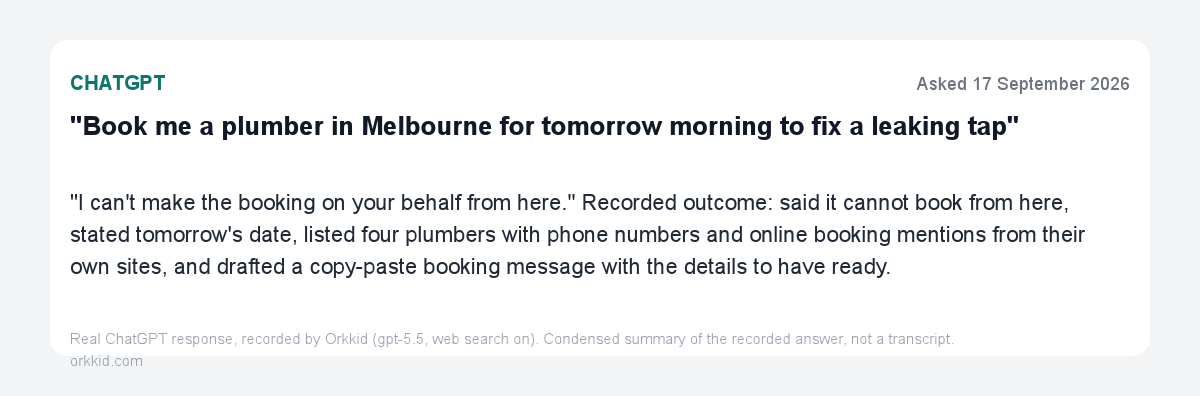
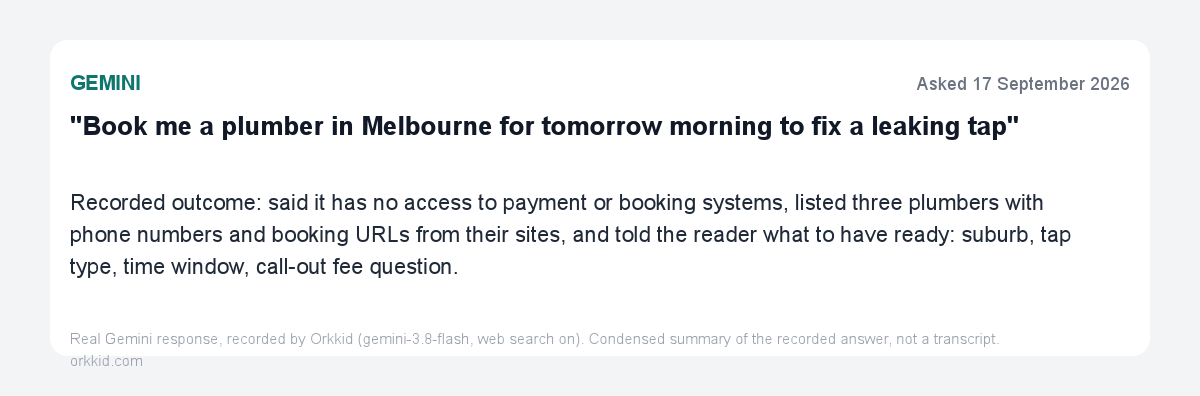
Read those two cards as a job spec for your website. The engines pulled phone numbers and booking URLs off the plumbers' own sites. They named businesses that made same-day and one-hour response claims in plain text. Gemini went further and told the customer exactly what to have ready on the call: suburb, tap type, time window, and a question about the call-out fee. If your site answers those four things before someone picks up the phone, you are the easy option.
This was an API test, not the consumer app with a cloud browser attached, and we say so plainly. The consumer app may attempt more. What it will not do is invent a phone number that is not published somewhere it can read.
One more detail worth your attention. Perplexity's twenty citations included two plumbers in Melbourne, Florida. It is the same failure our wider panel showed when ChatGPT stopped to ask whether a customer meant Hobart, Tasmania or Hobart, Indiana. A large language model resolves your suburb from text, and half the Australian place names it reads have an American twin.
Emergency questions are where AI hands over a phone number
Phone numbers appear when the question is urgent, and almost never when it is not. On the same day as the booking probe we ran a 20-prompt panel of "who should I call" questions across four engines. Phone numbers turned up in 1 of 20 ChatGPT answers, 4 of 20 Gemini answers and 3 of 20 Perplexity answers.
The prompts that produced them were the ones with a deadline attached. "Who should I call for a blocked drain in Melbourne" returned operators with numbers pulled straight off their websites. "Recommend an emergency vet in Wollongong" returned one clinic with address, phone and hours, and a note to call ahead. Ask an engine for the best accountant and you get names and a comparison. Ask it for help at 9pm on a Sunday and you get a number to ring.
That is your priority order. If you sell an emergency or after-hours service, the phone number is the product, and it needs to be text on the page, text in your Google Business Profile, and the same number in both places. We wrote up what engines actually read from your listing in our guide to Google Business Profile AI recommendations; this page is about what happens in the seconds after they read it.
What a service business needs ready for the agent era
Seven items, ordered by how much they change the outcome, and none of them takes a developer a week. Every one is drawn from a documented pause point in OpenAI's own material: the agent stopped at logins, stopped at CAPTCHAs, and read pages through screenshots. This checklist is our reading of that behaviour, not guidance published by OpenAI.
- Put your phone number in text on every page (15 minutes). Not in an image, not in a logo, not only in a click-to-call button with no readable digits. Engines quoted numbers off plumbers' own sites in our probe. If yours is a graphic, it does not exist.
- Make the first step of booking reachable without a login (30 minutes to half a day). The help article states the agent "will pause and prompt you to take control of the virtual browser" when a task requires a login. A customer who has to create an account before choosing a time is where both agents and humans quit.
- Remove the CAPTCHA in front of your first form field (30 minutes). Put spam protection after submission, or use a honeypot field. Both independent tests of agent mode needed a human takeover for a CAPTCHA. Our guide to contact forms for service businesses covers the replacement patterns.
- Put the state in your title tag, your address block and your footer (20 minutes). "Plumber Melbourne VIC" beats "Plumber Melbourne" for exactly the reason Perplexity cited two Florida plumbers. Say the state the way an Australian says it, then say it once in full.
- Write your service and suburb in body text, not just in a hero image or video (1 to 2 hours). The agent read pages through screenshots of a browser window. Text baked into an image is text a machine has to guess at.
- Check your opening hours today, and set your holiday hours (5 minutes). Emergency prompts are the ones that produce phone numbers, and "open now" is what decides which business gets listed first.
- If you block bots, allowlist the agent (varies). OpenAI's help article has a section headed "Allowing agent mode to access your website" that points to its allowlisting guide. If your firewall blocks unknown user agents by default, check it before you assume your site is readable.
Two ways to check the current state without guessing. The AI citation checker tells you whether engines name you for your own service prompts, and a free AI SEO audit covers the phone, form and text problems above in one pass. If you are a plumbing business, our page on AI SEO for plumbers has the trade-specific version of this list, and AI SEO in Melbourne covers the city where we ran the probe.
Will an AI ever book the job for you?
Probably, and not yet. OpenAI has named a cloud browser as the path for browser workflows and Google is grounding Gemini answers in Maps data, which is the direction of travel. But as of September 2026 no engine we tested completed a booking, and the two that could have tried instead handed the customer a phone number and a script. There is a reason beyond capability: the moment an AI commits you to a call-out fee on a stranger's behalf, someone has to own the mistake.
What that means for your week is simple. The conversion still happens on your phone line or your booking page, so the work is to be the business the engine names and then to answer when it rings. Speed to lead has not stopped mattering because the referral now comes from a chatbot. If anything it matters more, because the customer arrives holding a script an AI wrote for them, and they will ring the next name on the list if you do not pick up. The mechanics of getting named in the first place are in our AI SEO services pillar and in how ChatGPT decides which businesses to recommend. For the page-by-page how-to there is our guide to getting cited by ChatGPT search, which is the ranking checklist for ChatGPT search; this page is about the product change and what happens at the booking step.
When a vendor asks who to list with, whose name does AI give?
We tested 151 top-rated Australian tradies and 84% were never named by ChatGPT. Check your agency before your competitor checks theirs.
Tested: 151 top-rated Australian tradies · 15.9% named by ChatGPT · Q3 2026 study
Check my AI visibility →FAQ
Is ChatGPT agent free?
It never was, and its replacement is not either. OpenAI's help centre states agent mode was available only on paid plans, with Plus limited to 40 messages a month and Pro to 400. ChatGPT Work, the product OpenAI now points users to, sits inside Business, Enterprise and Edu plans, with Plus plans getting GPT-6 Astra in Work. There is no free tier for either.
What is ChatGPT Work?
ChatGPT Work is OpenAI's agentic product for business tasks, launched on 9 July 2026 alongside GPT-5.6. OpenAI describes it as gathering context, planning an approach and acting across your tools, files and desktop apps to produce spreadsheets, docs and slides. It connects to workplace systems including Slack, Teams, Gmail and Google Drive. It is the product the help centre now sends agent mode users to.
Can ChatGPT book a tradie for me?
No. We tested it on 17 September 2026 with the prompt "Book me a plumber in Melbourne for tomorrow morning to fix a leaking tap", and ChatGPT, Gemini and Perplexity all declined to place the booking. What they did instead was name three or four local plumbers, supply phone numbers or booking links, and draft the message for the customer to send. The call still happens between two humans.
How do I get ChatGPT agent now?
You cannot. The agent mode toggle and the slash command are still documented, but the help centre says the product is no longer available, and the Operator site it absorbed is no longer accessible either. The current paths are ChatGPT Work for multi-step tasks, workspace agents for team workflows, and the cloud browser for browser-based work. All three need a paid plan.
Is ChatGPT agent still available on Windows?
No, and the help article is the reason people think otherwise. It still lists agent as supported on ChatGPT Web, mobile and the macOS and Windows desktop apps, because that section was written before the retirement and was never removed. The first paragraph of the same article says the product is no longer available. Treat the opening notice as current and the device list as history.